VocalFilter is a three-formant vocal-tract model as a VST3 and Audio Unit effect for macOS. Stereo in, stereo out. Feed it anything with harmonics and it puts a vowel on it.
New in 1.0.1.0
The maker is now “AE Cobley”, in both formats — it was “A. E. Cobley”. REAPER files an Audio Unit's presets under its name cut off at the first full stop, so every A. E. Cobley Audio Unit shared one REAPER preset list and showed the others' presets, which did nothing when chosen. The plug-in's identity codes are unchanged, so projects saved with earlier versions still open with VocalFilter in place. Hosts that list plug-ins by maker now show it under AE Cobley. Nothing in the sound changed.
After upgrading. Presets you saved in a
host that files them by maker are in
~/Library/Audio/Presets/A. E. Cobley/VocalFilter
— move them to
~/Library/Audio/Presets/AE Cobley/VocalFilter to see them
again. In REAPER, Audio Unit presets you saved earlier stay in its old
shared list; the VST3 is unaffected.
What it does
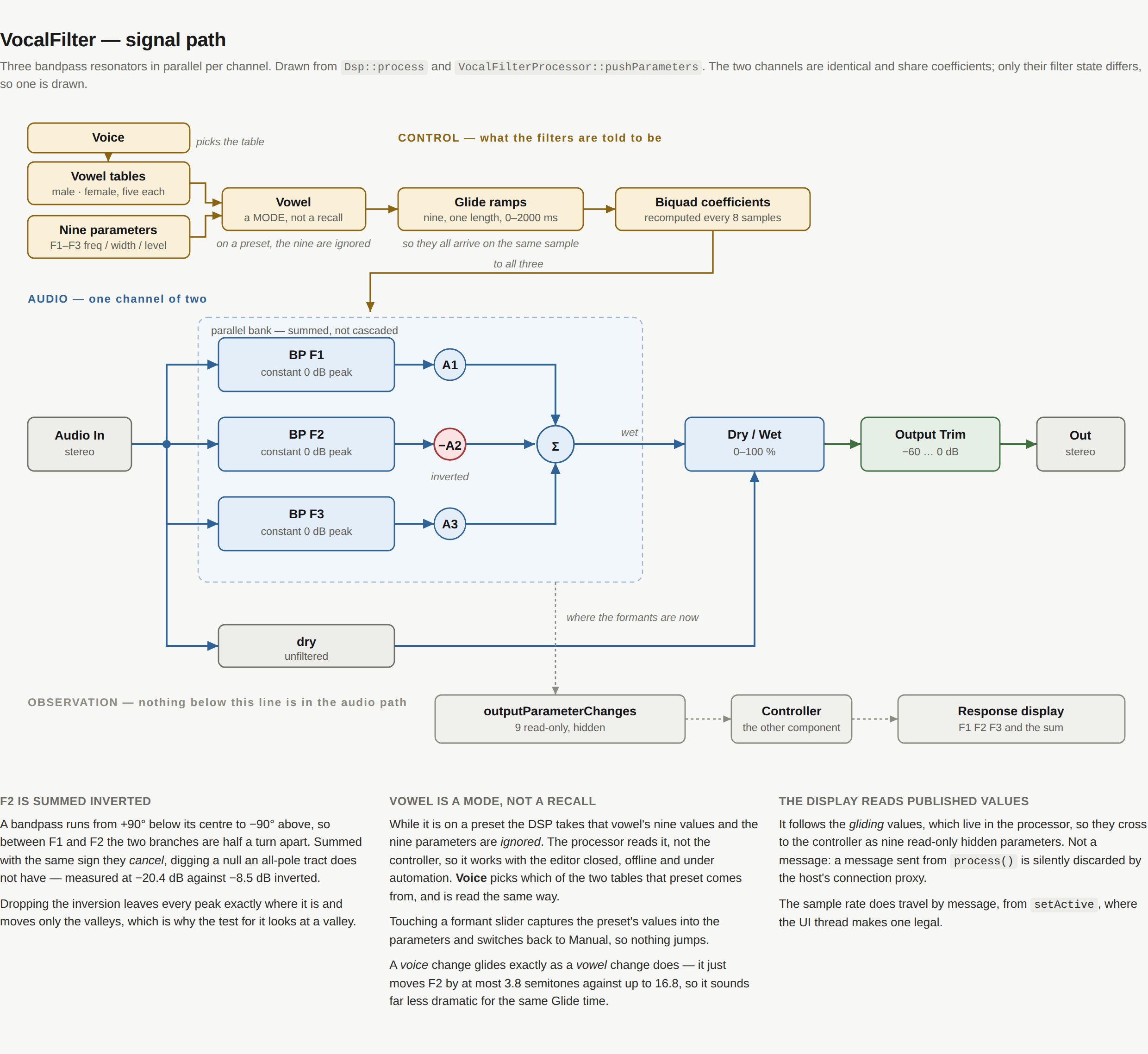
On each channel, three bandpass resonators in parallel, summed, mixed against the dry signal and trimmed:
BP(F1) × A1BP(F2) × −A2BP(F3) × A3
Parallel rather than cascaded because a parallel bank lets each formant carry its own amplitude, which is the point of dialling a vowel by hand. F2 is summed inverted: three bandpasses added in phase cancel between the peaks and dig a null a real tract does not have.
The filters are RBJ constant-0 dB-peak bandpasses, so a formant's Level is its level and the Width control is not secretly a second gain.
The five vowels, in two voices
One button each, a Vowel parameter the host can automate, and a Voice switch between an adult male and an adult female tract.
| Vowel | Sound | F1 | F2 | F3 | B1 | B2 | B3 | A1 | A2 | A3 |
|---|---|---|---|---|---|---|---|---|---|---|
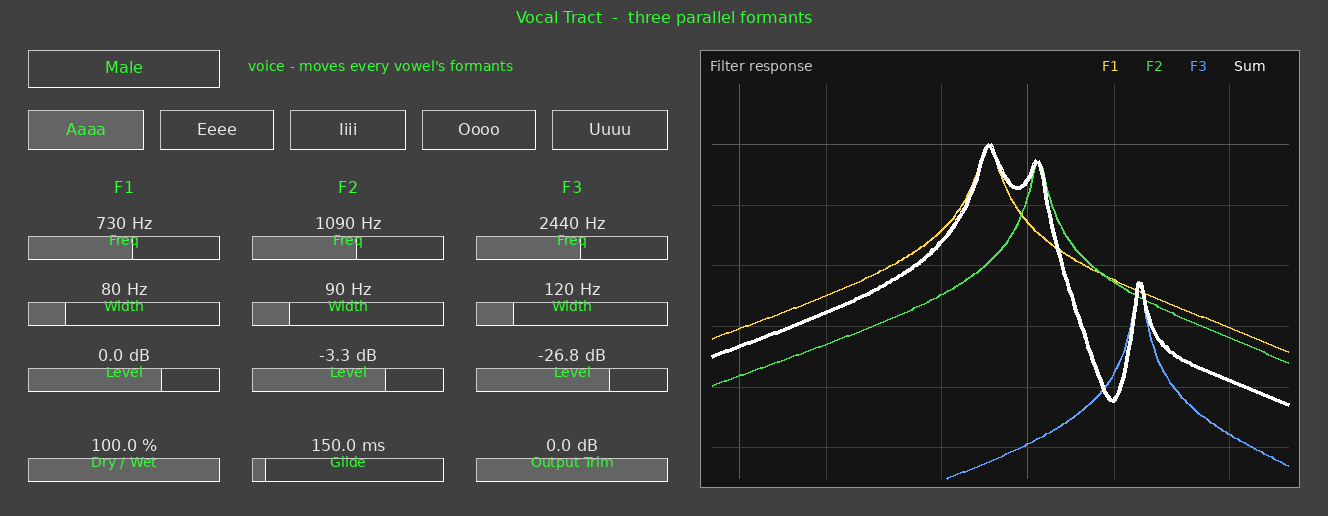
| Aaaa | /ɑ/ father | 730 | 1090 | 2440 | 80 | 90 | 120 | 0 | −3.3 | −26.8 |
| Eeee | /i/ beet | 270 | 2290 | 3010 | 50 | 100 | 140 | 0 | −8.0 | −2.3 |
| Iiii | /ɪ/ bit | 390 | 1990 | 2550 | 60 | 100 | 130 | 0 | −8.2 | −7.6 |
| Oooo | /o/ boat | 450 | 900 | 2400 | 60 | 90 | 120 | 0 | −7.4 | −30.0 |
| Uuuu | /u/ boot | 300 | 870 | 2240 | 50 | 90 | 120 | 0 | −10.2 | −30.0 |
Frequencies in hertz, levels in decibels. These are the classic adult-male means from Peterson & Barney (1952), so all five sit in one consistent voice. The exception is Oooo: the letter O names a diphthong, /oʊ/, which they did not measure, so that row carries the common /o/ set and is marked as such in the source.
The female table is their adult-female means — a shorter tract, so every formant higher: Aaaa becomes 850/1220/2810 and Eeee 310/2790/3310. Oooo is scaled from the male /o/ set by the mean male-to-female ratio of the three back vowels they did measure. Bandwidths sit mid-range of the measured adult spread, narrower at B1 for the close vowels.
Levels are derived, not chosen. A vocal tract is an all-pole filter, so formant amplitudes are a consequence of the frequencies rather than free parameters — which is why a cascade synthesiser needs no amplitude controls and a parallel one cannot do without them. Each pair is fitted against the all-pole cascade those formants imply.
Both voices share those levels, deliberately: a shorter tract moves where the resonances sit, not much how they are balanced. Refitting them for the female set puts one formant outside its parameter's range and gives /i/ no F2 peak at all.
Controls
| F1 / F2 / F3 Freq | 200–1200, 500–3000, 1500–4000 Hz — defaults to the Aaaa patch |
|---|---|
| F1 / F2 / F3 Width | 20–400 Hz — defaults 80 / 90 / 120 |
| F1 / F2 / F3 Level | −40 … +12 dB — defaults 0 / −3.3 / −26.8 |
| Dry / Wet | 0–100 % — default 100 |
| Glide | 0–2000 ms — default 150 |
| Output Trim | −60 … 0 dB — default 0 |
| Vowel | Manual, Aaaa, Eeee, Iiii, Oooo, Uuuu — default Manual |
| Voice | Male, Female — default Male |
Glide is how long a formant takes to reach a new value. It is a timed linear ramp, one length for all nine parameters, so however far each has to travel they all arrive on the same sample. 150 ms by default because that is roughly what a diphthong glide takes in speech. Zero is floored at 20 ms — an instant jump of F2 from 870 Hz to 2290 Hz is a click.
Vowel is a mode. While it is on a preset the DSP uses that vowel's values and the nine formant parameters are ignored; touching a slider on the panel captures the preset's values and switches back to Manual, so nothing jumps.
Voice picks which of the two tables a preset comes from. It is read by the processor the same way, so it works with the editor closed and under automation, and a voice change glides exactly as a vowel change does — it just moves F2 by at most 3.8 semitones against up to 16.8, so the same Glide time sounds far less dramatic.
The display
The display draws each formant's response — F1 yellow, F2 green, F3 blue — and the summed response in white, following the DSP in real time as it glides. The axis is fixed at 80 Hz to 8 kHz and +12 to −66 dB so two vowels can be compared; the floor is that low because three resonators summed with alternating polarity notch far deeper than any of them does alone.