SpyBand is a band vocoder, ported from the 2004 Cakewalk DXi to VST3 and Audio Unit for macOS and rebuilt from its own sources rather than reimplemented from its behaviour.
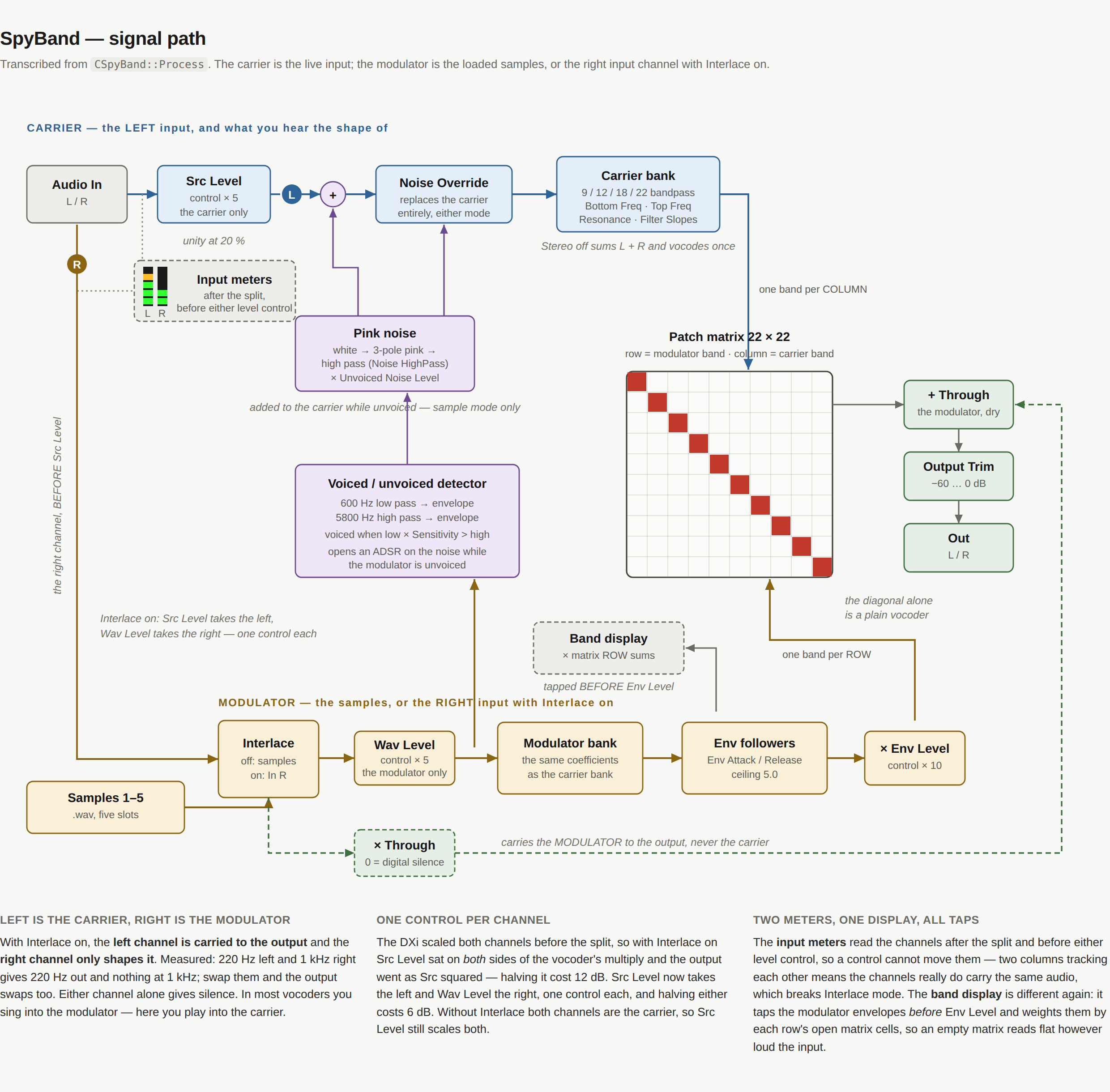
It runs the input through a bank of 9, 12, 18 or 22 bandpass filters, takes the envelope of each band of a second signal, and multiplies the two together through a 22 × 22 patch matrix — so any band of the modulator can drive any band of the carrier, not just its own. The diagonal is a plain vocoder. Everything off it is why the plug-in exists, and is what it is named after.
New in 1.0.1.0
The maker is now “AE Cobley”, in both formats — it was “A. E. Cobley”. REAPER files an Audio Unit's presets under its name cut off at the first full stop, so every A. E. Cobley Audio Unit shared one REAPER preset list and showed the others' presets, which did nothing when chosen. The plug-in's identity codes are unchanged, so projects saved with earlier versions still open with SpyBand in place. Hosts that list plug-ins by maker now show it under AE Cobley. Nothing in the sound changed.
After upgrading. Presets you saved in a
host that files them by maker are in
~/Library/Audio/Presets/A. E. Cobley/SpyBand
— move them to
~/Library/Audio/Presets/AE Cobley/SpyBand to see them
again. In REAPER, Audio Unit presets you saved earlier stay in its old
shared list; the VST3 is unaffected.
Read this first, or it will seem broken
Three things about SpyBand are the opposite of what you would guess, and between them they account for every "this is faulty" moment during the port.
1. The live input is the CARRIER, not the modulator. In
most vocoders you sing into the modulator and a synth is the carrier. Here
it is the other way round: your input is the thing being shaped,
and the loaded .wav files — or the right input channel
— do the shaping. So the input is always audible in the output. That
is the plug-in working, not leaking.
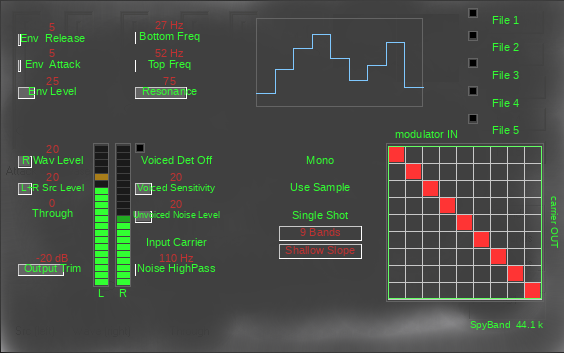
2. It is nearly silent at its factory defaults. Bottom Freq and Top Freq default to 1 % and 2 %, which puts all nine bands between 26.8 Hz and 51.8 Hz. These are the DXi's own defaults, kept deliberately. Move both controls before judging anything.
3. Interlace mode needs a genuinely stereo input. It makes the LEFT channel the carrier and the RIGHT channel the modulator. Feed it a mono source and the signal becomes its own modulator: every band gets multiplied by its own envelope, which is a per-band squaring that sounds like harsh distortion. Watch the two LED columns. If they move identically, you have a mono source and no plug-in setting will help.
Getting a sound out of it in thirty seconds
The fastest route needs no files at all:
- Put SpyBand on a track carrying a stereo signal with different content in each channel.
- Set Interlaced to
Interlace. - Set Bottom Freq to about 50 % and Top Freq to about 92 % — that spans roughly 100 Hz to 8 kHz.
- Play. The left channel is now vocoded by the right.
For the intended workflow, load a .wav instead: click a
File button (anywhere except its lamp) and choose a file,
click that button's lamp to enable the slot, leave
Interlaced on Use Sample, and set the two
frequency controls as above. Your input is the carrier; the file is the
modulator.
The controls
Levels
- Src Level — the carrier. Unity at 20 %; the top
of the control is +14 dB. Reads
L Src Levelwith Interlace on,L+Rwithout, because without Interlace both channels are the carrier. - Wav Level — the modulator: the right channel with Interlace on, the sample slots without it.
- Through — passes the modulator to the output dry. It never touches the carrier. At zero it is digital silence.
- Output Trim — −60 to 0 dB. The top of it is the original's own gain staging, so nothing is lost; it defaults to −20 dB because the DXi's staging clips at anything past nine bands.
The bands
- Bottom Freq — centre of the lowest band. The readout shows the actual frequency.
- Top Freq — spread. Together with Bottom Freq this sets where all the bands land; the readout shows the highest band's centre.
- Resonance — band width, as a bandwidth in octaves. Higher is narrower.
- Bands — 9, 12, 18 or 22. More bands is more resolution and more level.
- Filter Slopes — Shallow, Medium or Steep: one, two or three cascaded sections, giving 6, 12 or 18 dB/octave skirts. It does not change the level at a band's centre; it trades band overlap for separation. Steep sounds more articulate and about 5 dB quieter on broadband material.
The envelope
- Env Attack — 1 to 251 ms. How fast a band opens.
- Env Release — 1 to 101 ms. How fast it closes. Short is articulate, long is smeared.
- Env Level — multiplies every band envelope, up to ×10. This is the main "amount" control.
Voiced / unvoiced
A vocoder gets its consonants from noise. This detector watches the modulator and opens a pink-noise substitute when it goes unvoiced.
- Voiced Detect — arms the detector. Its lamp lights while the modulator is voiced.
- Voiced Sensitivity — the threshold: low-band level × this, against the high-band level.
- Unvoiced Noise Level — how much noise gets substituted.
- Noise HighPass — corner of a high pass on that noise.
- Noise Override —
Input Carrieruses your input;Noise Carrierreplaces it with pink noise entirely, in either mode.
Modes
- Stereo —
Monosums L+R and vocodes once.Stereoruns two independent banks. Interlace forces Mono. - Interlaced —
Use Sampletakes the modulator from the file slots;Interlacetakes it from the right input channel instead. - Single Shot / Repeat — whether a sample loops.
The patch matrix
The 22 × 22 grid is the heart of it. Row runs across and is the modulator; column runs down and is the carrier. Set the diagonal and you have an ordinary vocoder. Every cell off the diagonal routes one part of the spectrum to control another — low bands opening high ones, spectral inversion, and anything else the grid allows.