SampleDrum is a sample-based drum instrument: an 8 × 4
grid of cells, each holding one .wav you drop on it
from the Finder. A column is a drum and a row is a
velocity band, so the kit is laid out the way you play it: across
for which drum, down for how hard.
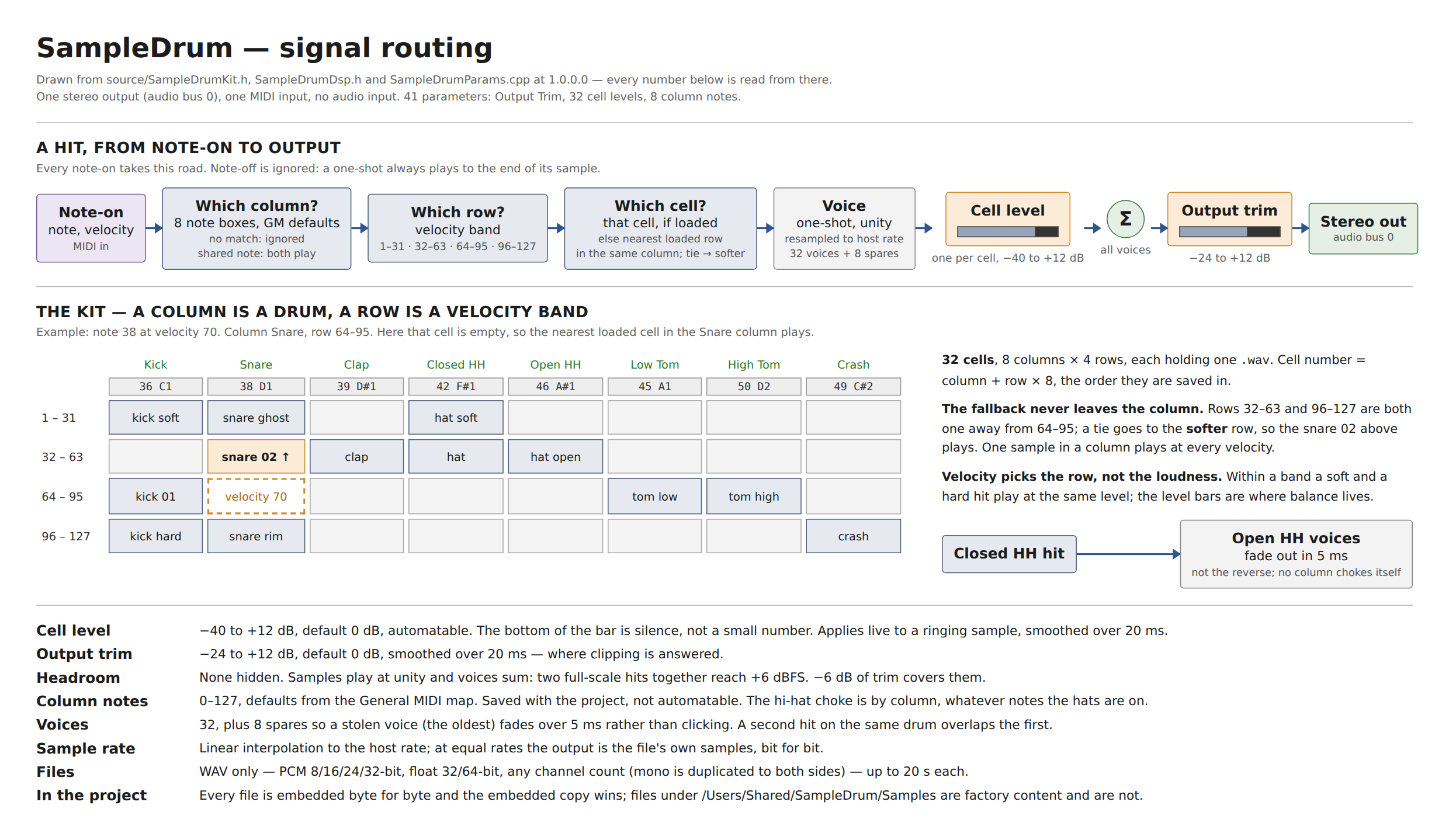
41 parameters — an Output Trim, a level for each of the 32 cells and a note for each of the 8 columns. One stereo output, no audio input, 32 voices.
The grid
A column is a drum
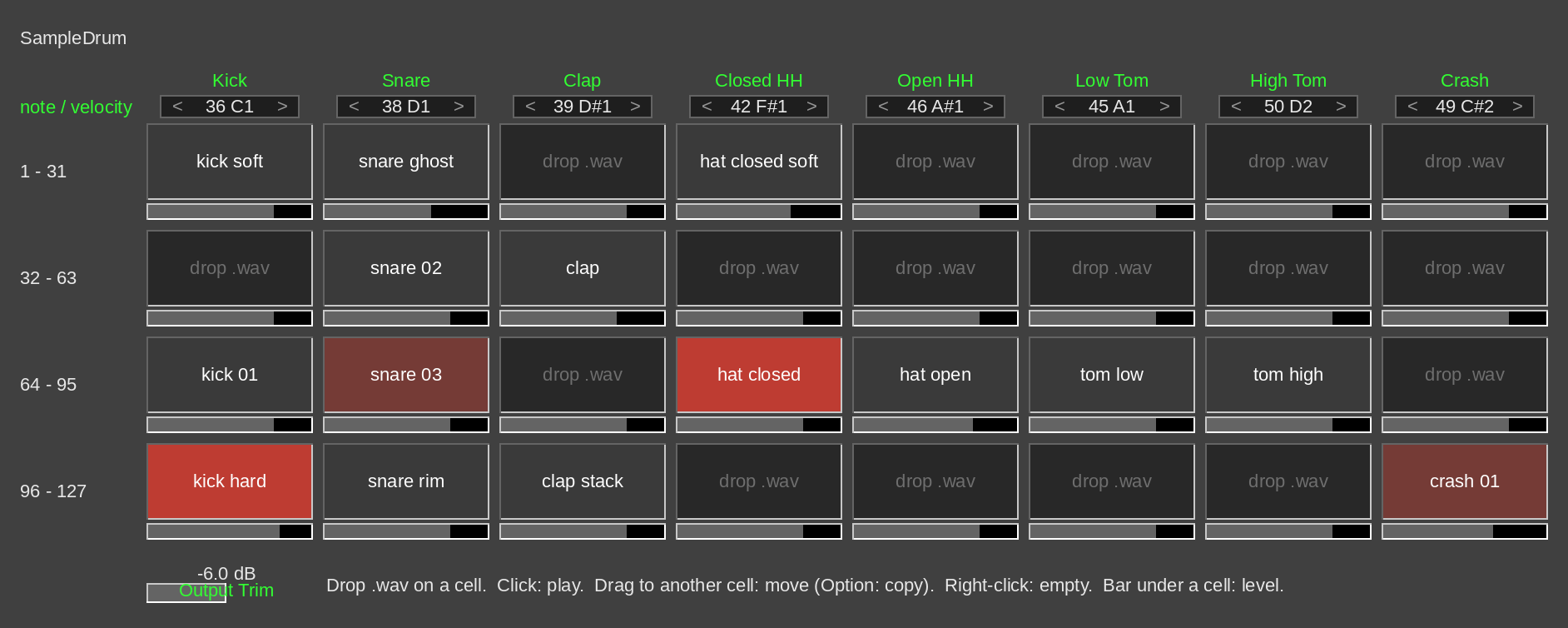
Each column answers to one MIDI note. The defaults are the General MIDI drum map — Kick 36, Snare 38, Clap 39, Closed HH 42, Open HH 46, Low Tom 45, High Tom 50, Crash 49 — so any GM drum pattern plays the right drum with no setup.
The note box at the top of each column changes it. Click an end to step a semitone (Shift: an octave), drag up or down, or scroll; Option-click goes back to the default. Two columns on the same note both play, which is how you layer two samples on one hit, and both boxes turn amber so it is not done by accident. A note no column has is ignored. Notes are shown with the number first, and 36 is C1.
A row is a velocity band
Four bands, top to bottom: 1–31, 32–63, 64–95 and 96–127 — the harder the hit, the lower the row. Put a ghost snare in the top row and a rimshot in the bottom one, and the drummer's dynamics choose between them.
An empty cell borrows the nearest loaded cell in the same column, and a tie goes to the softer one. So one sample in a column plays at every velocity, and you only fill the rows you want to differ. A cell never borrows from another column.
Levels, and the hi-hat
- A level bar under every cell, −40 to +12 dB, default 0 dB, and automatable. The bottom of the bar is silence. While you drag it the cell reads out the level; Shift drags finely.
- Output Trim, −24 to +12 dB, sets the whole kit.
- Closed hi-hat cuts open hi-hat with a 5 ms fade, as a pedal does. It works by column, so it follows the hats wherever you move their notes.
Working the panel
- Click a cell to hear it.
- Drag a cell onto another to move it; onto a loaded cell, the two swap, levels and all. Hold Option or Control at the drop to copy instead.
- Right-click (or Control-click) a cell and choose Clear cell to empty it.
- Cells flash on every hit and stay dimly lit while they sound, so even a hi-hat shorter than one screen redraw shows.
Samples play once, to the end, at the file's own sample rate converted to the host's. When the two rates match, what comes out is the file's own samples, bit for bit.
Projects travel
Every sample you drop is saved inside the project, byte for byte, so a project sent to someone else opens with the whole kit playing, whether or not they have your files. The copy in the project is the one that plays; if you edit a sample on disk, drop it on the cell again to bring the new version in.
Files in /Users/Shared/SampleDrum/Samples are the exception.
That is the factory samples folder, the same path on every Mac, so they are
not copied into projects. 1.0.0.0 ships no factory samples; when a release
does, the installer will offer them as a third choice.
Three things that will look like bugs and are not
Samples play at their own level, and hits add up. A kick and a snare each normalised to 0 dBFS, struck together, reach +6 dBFS and clip. That is how drum samplers behave, and no headroom is hidden to disguise it. Turn Output Trim down (−6 dB covers two coincident full-scale hits), or use samples that are not normalised to full scale.
Velocity chooses the row, not the loudness. Within a row a soft hit and a hard hit play at the same level; the four rows are where the dynamics live, and the level bars set how loud each cell is.
Projects grow by the size of their samples, because the samples are inside them. That is what lets them open on another Mac.
Known gaps
- WAV only, up to 20 seconds per file — PCM 8/16/24/32-bit or 32/64-bit float, any channel count (mono plays on both sides).
- One stereo output. No per-drum outputs yet.
- No pan or tuning per cell.
- Note-off is ignored — every hit plays to the end of its sample.
- A cell dragged from another SampleDrum window is read from disk, not from the other window's project, so on a Mac without the file it comes across as “file not found”.
Uninstalling
A .pkg never will, so:
sudo rm -rf /Library/Audio/Plug-Ins/VST3/SampleDrum.vst3sudo rm -rf /Library/Audio/Plug-Ins/Components/SampleDrum.component
Your projects keep their samples; nothing else is installed.