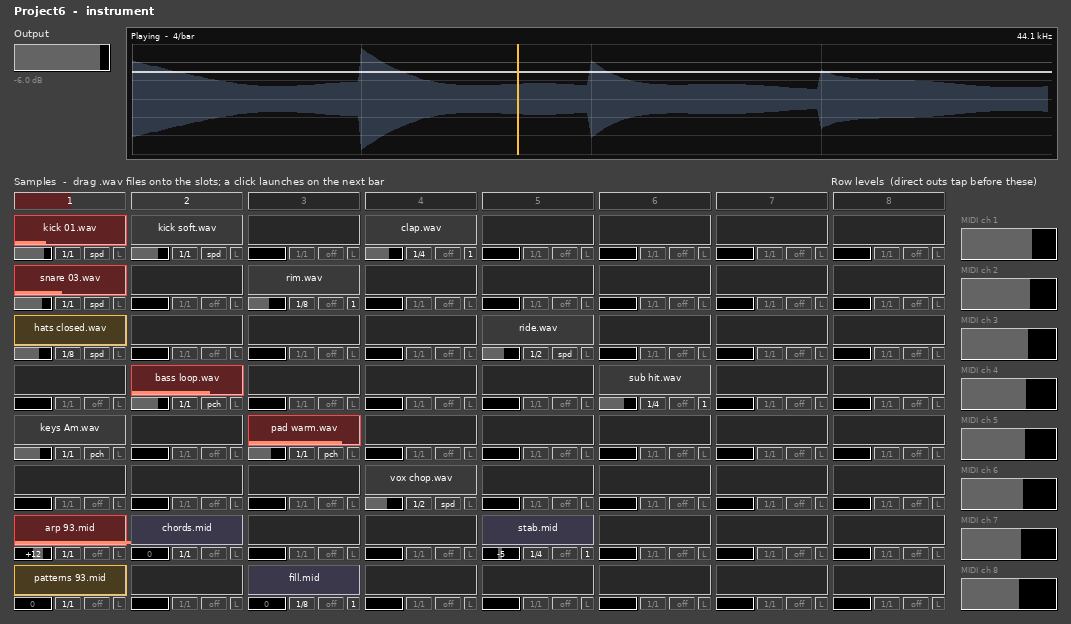
Project6 is an instrument for macOS: an 8 × 8 bank of
looping sample pads, launched on the bar. Drag a .wav
onto a slot from the Finder and it loads. Click the slot to arm it; it starts
when the transport crosses the next grid line. Click again
and it stops on the line after that. Nothing sounds while the transport is
stopped, and a pad left armed comes back in when it rolls again.
New in 1.2.0.0
Projects travel
Each pad's file is now saved inside the project, so a project sent to someone else opens with every pad playing, whether or not they have your files. The copy in the project is the one that plays, so a project always sounds as it was saved; to pick up a sample you have edited since, drop it on the pad again. Moving, copying or swapping pads takes the saved copy with it.
Files in /Users/Shared/Project6/Samples are the
exception. That is the same path on every Mac, so every copy of
Project6 can have them, and they are not copied into projects. It is the
factory samples folder: the installer fills it when a release ships factory
samples.
Clearing a pad, and missing files
Right-click (or Control-click) a pad and choose Clear pad to empty it; the file leaves the project too. A pad whose file has gone now says “File not found” rather than lumping that in with a file that could not be read.
Older projects still open, reading their files from disk as before; save them once in 1.2.0.0 and their files are saved in too. Projects saved with 1.2.0.0 open in earlier versions, which ignore the saved files and read from disk.
Projects are larger by the size of the files on their pads. In REAPER, which saves the plug-in's state at every undo step, a project with many long WAVs may make editing feel slower.
New in 1.1.1.0
The maker is now “AE Cobley”, in both formats — it was “A. E. Cobley”. REAPER files an Audio Unit's presets under its name cut off at the first full stop, so every A. E. Cobley Audio Unit shared one REAPER preset list and showed the others' presets, which did nothing when chosen. The plug-in's identity codes are unchanged, so projects saved with earlier versions still open with Project6 in place. Hosts that list plug-ins by maker now show it under AE Cobley.
The version is reported correctly. Earlier builds told hosts they were 1.0.0.1 (VST3) and 1.0.0 (Audio Unit) whatever the release; this one says 1.1.1.0. Nothing in the sound changed.
After upgrading. Presets you saved in a
host that files them by maker are in
~/Library/Audio/Presets/A. E. Cobley/Project6
— move them to
~/Library/Audio/Presets/AE Cobley/Project6 to see them
again. In REAPER, Audio Unit presets you saved earlier stay in its old
shared list; the VST3 is unaffected.
New in 1.1.0.0
Rest the pointer on a pad and you see what is in it
The pad's contents appear behind the main display: a
waveform for a .wav, a piano roll
for a .mid. Dropping a file on a pad shows it too, at once.
Pointing costs nothing and makes no sound, so looking at what a pad holds is no longer a matter of playing it. It takes a moment's dwell rather than the crossing of a border, so sweeping the pointer across the bank leaves the display alone instead of strobing through eight pads on the way past.
The piano roll scales to the range of pitches the file actually uses rather than to a full keyboard, so a two-octave bass line and a two-octave melody each fill the rectangle and the notes read in relation to one another. A long pattern is thinned by taking every nth note rather than the first few hundred, so what you see is the shape of the whole thing and not its opening bar.
Both summaries are computed once, when the file loads, and never on the audio thread. Neither is in the signal path at all.
Universal binary. This build is arm64 + x86_64, which is what the installer has claimed all along. Earlier builds were Apple Silicon only, so on an Intel Mac — or in a host running under Rosetta — Project6 installed cleanly and then loaded nothing. If you tried 1.0.0.1 and it never appeared, that was why.
The grid
Each pad chooses its own grid — 1/1,
1/2, 1/4 or 1/8, fractions of a bar, so
every division nests inside the bar and a 1/8 pad and a 1/1 pad launch
together on the downbeat. The little box beside each level bar sets it: click
to step forward, right-click to step back.
A box above each column launches the whole column — every loaded pad in it, together on the next bar line, which is the only way eight loops can start in time with each other. Press it again to stop them.
An armed slot glows amber while it waits and red while it plays, so the wait is visible rather than mysterious, and a bar along the bottom of a playing pad shows how far through its file it is. A column box fills in proportion to how much of its column is sounding. The display beside the pads is one bar wide, ruled into beats, with a playhead showing how long that wait has left.
Levels, and MIDI pads
A level bar under each pad sets that slot's own volume, −40 to +12 dB. It drags relative rather than jumping to the pointer, and the pad above shows the value in decibels while you do.
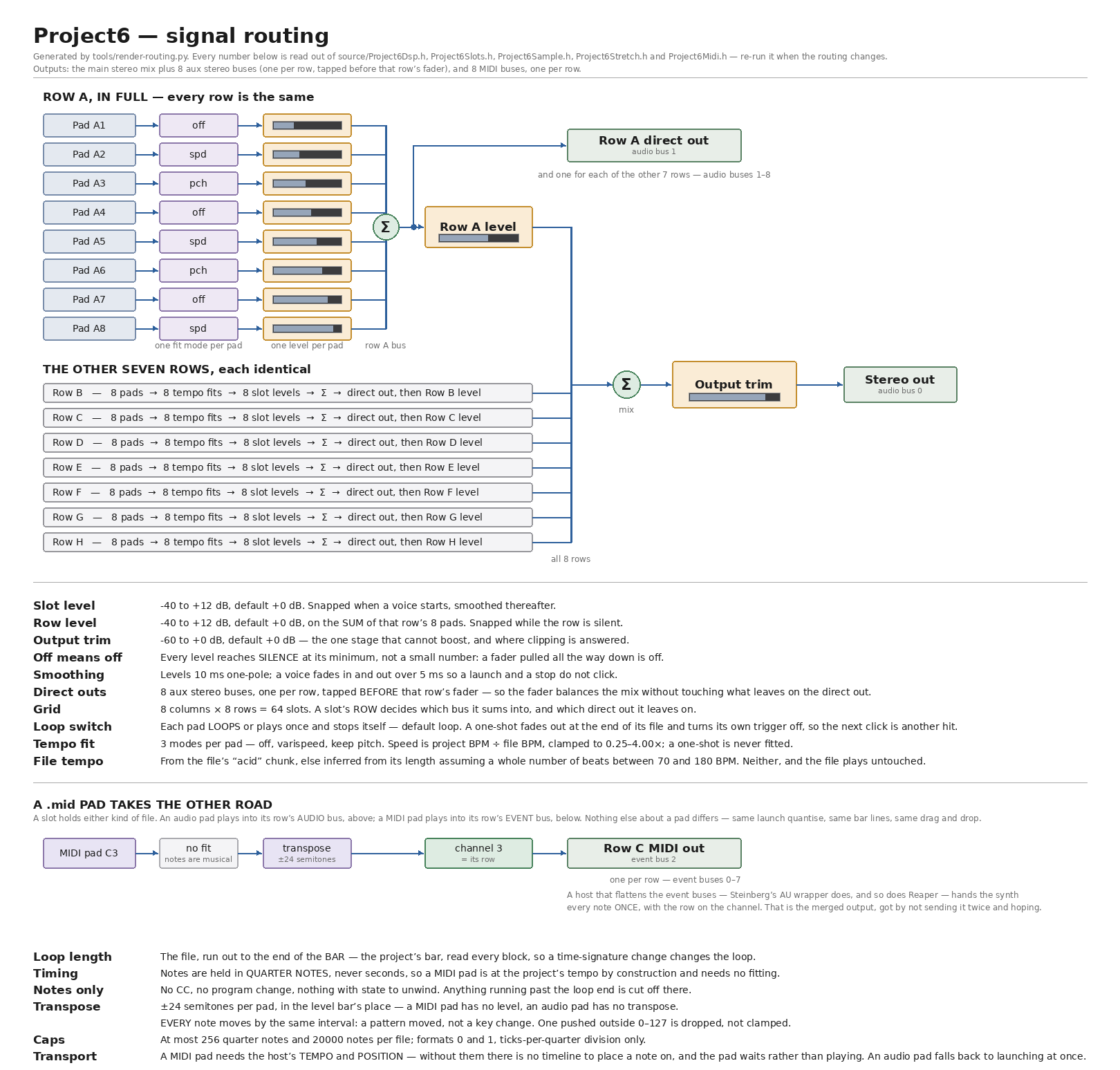
A slot can hold a .mid instead of a .wav.
It loops the same way, on the same grid, and plays out of that row's
MIDI output — row A on channel 1 through row H on
channel 8 — for a synth in the host to answer. A file that does not end
on a bar line has its loop run out to the end of the bar, so a pattern repeats
in time rather than drifting. Where an audio pad has its level bar, a MIDI pad
has a transpose: up to two octaves either way, every note
moved by the same interval — a pattern moved, not a key change.
Double-click it to go back to the file's own pitch.
Two host quirks, neither of them this plug-in
Apple's AUMIDISynth and a looping transport: use a different synth. AUMIDISynth goes completely silent at a transport loop point and stays silent until the transport is stopped, while the MIDI goes on arriving. A MIDI monitor immediately in front of it shows a clean, balanced note stream continuing across the loop point with nothing injected by the host, and another synth fed the identical stream in the identical slot plays on through it.
MIDI out and Reaper: use the VST3. Reaper never asks an Audio Unit whether it has MIDI output and never sets a callback for one, so a MIDI pad's notes have nowhere to go there — the plug-in emits them and the host is not listening. Traced property by property. The VST3 works in Reaper and the AU works in Logic.
Buses
Each row sums to a fader on the right. The eight pads of a row go through their own levels, sum, pass that row's level, and the eight rows sum into the output trim.
Nine output buses: the main stereo mix, plus one stereo aux bus per row carrying that row's direct out, tapped before the row fader — so the fader balances the mix without touching what leaves for the desk.
State
Levels are saved with the project and automatable like everything else, and so is which pads are armed, and so is each pad's file. Reopen a project and the same cells are lit and waiting, coming in together on the next bar line when you roll the transport. A pad whose file cannot be found — one from a project saved before 1.2.0.0 whose file has since moved — comes back dark rather than lit and silent. Every pad is also a host parameter, so a DAW can automate, record and undo it.
Underneath, it is still the shell a bigger instrument goes inside — buses, parameter plumbing, event handling, state and seven test suites, with the traps already handled. There is no synthesis yet: a MIDI pad emits notes for something else to play, and the event input consumes what arrives without sounding it.